

In 2005 I watched a single news photo load on the family PC. It arrived in grey horizontal strips, top to bottom, like a blind being lowered very slowly. I made tea, came back, and the picture was still two-thirds there.
Nobody under twenty-five believes that story, and that is exactly the point. You never think about it, but the web you use today would feel broken to someone from 2005. Pages that once took a minute now appear before you’ve finished the thought that made you click.
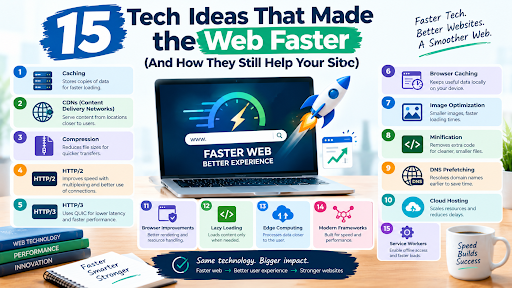
None of that came from one clever invention. It came from a stack of tech ideas that made the web faster, each one going after a different delay: slow pipes, distance, file size, wasteful connections, bad timing, and code that ran too slowly. I’ve ordered them roughly by the problem they met, not by hype, and I’ll tell you at the end which one mattered most.
A challenge before we start. Some of these 15 ideas happen on your visitor’s side, like their broadband and their browser, and you can’t change them. Others you control from your own dashboard. Keep count as you read: how many of the ones you control is your website actually using? Most sites I’ve audited are missing at least two.
Why speed became everything
People leave slow pages, and website speed has mattered since the dial-up days. The stakes rose once phones became the main screen and search engines started measuring the experience directly.
Google’s Core Web Vitals boil that experience down to three numbers. Largest Contentful Paint (LCP) tracks how quickly the main content shows up. Interaction to Next Paint (INP) tracks how fast the page responds when you tap or click. Cumulative Layout Shift (CLS) tracks whether things jump around while loading. A “good” score means LCP within 2.5 seconds, INP within 200 milliseconds and CLS at or below 0.1, measured at the 75th percentile of real visits.
If you’re reading older guides, watch for one thing. INP replaced First Input Delay (FID) as a Core Web Vital on March 12, 2024, so any article still leaning on FID is working from stale notes.
Does speed move rankings? Honestly, less than SEO folklore claims. Google’s Martin Splitt has described Core Web Vitals as a very small factor in most cases. The bigger payoff is human. According to web.dev’s case study on Vodafone, the company improved LCP by 31% and reported 8% more sales. People buy from pages that don’t make them wait.
Idea 1: Broadband, or the pipe gets wider
Start with the blunt one. Dial-up topped out at 56 Kbps and tied up the phone line. A page with a few photos could take a minute or more, which is exactly the grey-strips picture from the top of this article. Early broadband over DSL and cable moved into the hundreds of Kbps and then several Mbps. Fibre now delivers a gigabit or more by sending pulses of light through glass instead of electricity through copper. On paper, a gigabit line is roughly 18,000 times faster than 56 Kbps.
Two things mattered beyond raw speed. Broadband was always on, so there was no dialling in and no waiting for a handshake tone. And it gave every later idea on this list something to build on: streaming, CDNs and cloud apps would make little sense on a dial-up modem.
The catch is that bandwidth is only part of the story. Once the pipe is wide enough, delay (latency) and the number of round trips take over, which is why most of the remaining ideas deal with those rather than raw speed. A gigabit connection to a slow site is still a slow site.
Idea 2: Mobile networks, from 3G to 5G
Speed isn’t only about wires. For billions of people the first, and often only, connection is a phone, and mobile networks improved in steps. 3G made basic mobile browsing possible. 4G LTE, rolling out around 2010, made video streaming and app-heavy pages practical. 5G, from about 2019, aims at higher peak speeds and lower latency.
The catch is the gap between marketing and reality. Peak speeds are rarely what you get on a crowded street or inside a building, and real-world numbers vary a lot by operator, location and signal. Mobile connections also have higher and more variable latency, and they drop packets as you move. That is exactly the weakness HTTP/3 was built to handle (Idea 8).
So a fast phone network doesn’t excuse a heavy page. Test on a mid-range phone with throttled 4G, not on your office Wi-Fi, because that is closer to what many of your visitors actually experience.
Idea 3: Caching, or the art of not asking twice
A few years ago I changed a button colour on a client’s site, refreshed, and nothing happened. Refreshed again. Nothing. The CSS file was being served from a cache I had configured myself three weeks earlier, with an expiry of one full year. I had built a very efficient way to ignore my own work.
That is caching in one anecdote. Once your browser has downloaded a file, it can keep a copy and reuse it, so the second visit skips the network entirely. The server controls this with a Cache-Control header that says how long a copy stays fresh. When the copy does go stale, a validator called an ETag lets the browser ask a cheap question, “has this changed?”, and get back a tiny “304 Not Modified” instead of the whole file.
Server-side caching works on the other end: the server keeps finished pages instead of rebuilding them from database queries every time, which cuts time to first byte (TTFB).
The fix for my CSS disaster is now standard practice: fingerprint your filenames. A file called app.3f9a1c.css can be cached for a year, because the next version will have a different name and therefore a different URL. Our guide to browser caching covers the headers one by one.
The trade-off is staleness. Cache too aggressively without a purge plan and you’ll be debugging “ghost” content for days. Done well, though, caching is the clearest reason pages load quicker on every visit after the first.
Idea 4: Content delivery networks
The problem was geography
Light in optical fibre travels at roughly 200,000 kilometres per second. That sounds fast until you realise a page needs many round trips, and each one between continents costs tens of milliseconds before your server has done a single thing. You can’t fix physics with a bigger server.
The fix was moving the copies closer
A content delivery network (CDN) keeps copies of your files on edge servers spread across many cities. A visitor in Lahore gets served from a nearby node instead of waiting on a machine in Virginia. Akamai started selling this model in the late 1990s, and Cloudflare, which launched in 2010, later made it something a small blogger could switch on in an afternoon.
It also shortens TTFB, since the first byte has less distance to travel. That’s a big part of how pages load quicker for people far from your server.
One warning from experience: never let a shared cache serve pages that differ per user, like carts or account dashboards, or one person’s page ends up on another’s screen. It has happened to real companies, and it is a miserable day.
Idea 5: Compression
How much of a web page is information, and how much is repeated padding? Far more is padding than you’d expect: HTML is a wall of <div class=”…”>, and CSS repeats the same property names thousands of times. Text like that shrinks dramatically.
Gzip, created in 1992, became the default way servers compress text before sending it, and the browser unpacks it on arrival. Brotli, developed at Google and standardised in RFC 7932 in 2016, typically produces smaller files than Gzip for HTML, CSS and JavaScript.
Minification is a separate trick that people mix up with compression. It rewrites the file itself, stripping comments, whitespace and long variable names, before compression ever happens. Do both.
Two honest caveats. The highest Brotli levels are slow to compute, so precompress static files at build time and use a middle setting for pages generated on the fly. And skip JPEG, WebP and video, which are already compressed. Together, compression and minification are among the cheapest ways to make a page load quicker.
Idea 6: Modern image formats
JPEG dates from 1992, and it was a brilliant answer to a 1990s question. On many pages today, images are the heaviest thing the browser downloads, so a better format is the cheapest speed win going.
Google released WebP in 2010. AVIF came later, built on the AV1 video codec from the Alliance for Open Media. Both typically give smaller files than JPEG at similar visual quality, and AVIF often squeezes further.
People search “WebP vs AVIF, which is faster?”, and the question is slightly off. Neither is faster in itself. A smaller file simply downloads sooner. What differs is the cost around it: AVIF takes longer to encode, and decoding it can cost more on a weak phone. My habit is WebP as the safe default, AVIF for big hero images where the savings justify the extra build time.
You don’t have to gamble on support. The <picture> element lets the browser choose:
<picture>
<source srcset=”hero.avif” type=”image/avif”>
<source srcset=”hero.webp” type=”image/webp”>
<img src=”hero.jpg” width=”1200″ height=”600″ alt=”Describe the image”>
</picture>
Support for both formats is broad now, but check Can I Use against your own audience before dropping the JPEG fallback. For a closer comparison, see our breakdown of WebP and AVIF.
Check results by eye, too: aggressive AVIF settings can smooth skin until it looks like wax.
Idea 7: HTTP/2 and multiplexing
For years, web developers ran what was basically a hack shop. Combine thirty icons into a single sprite sheet. Glue all your JavaScript into one giant file. Spread assets across fake subdomains so the browser would open more connections. None of it was elegant. I spent evenings in 2012 nudging icons around a sprite sheet one pixel at a time, and all of it existed for one reason.
Under HTTP/1.1, browsers opened a handful of parallel connections to each host (around six is the usual figure), and each connection handled one request at a time. Lots of small files meant lots of waiting in line.
HTTP/2 fixed that. Published as RFC 7540 in May 2015 and growing out of Google’s SPDY experiment, it lets many requests share a single connection at once. That is multiplexing. It also compresses headers with a scheme called HPACK, which matters more than it sounds when every request repeats the same cookies and user-agent string. (RFC 9113 replaced it in 2022.)
Suddenly the old hacks were pointless, and some were actively harmful, since one huge bundle meant a tiny change forced a full re-download.
The catch is that HTTP/2 still rides on TCP. If one packet goes missing, every stream behind it stalls until it’s retransmitted. On a clean wired connection you barely notice. On a phone in a moving train, you really do.
Idea 8: HTTP/3 and QUIC
Look, this is the elegant one. The fix for TCP’s stall problem was to stop using TCP.
QUIC, standardised as RFC 9000 in May 2021, is a new transport protocol built on UDP. HTTP/3, defined in RFC 9114 in June 2022, maps web traffic onto it. Three practical differences matter. Streams are independent, so a lost packet only holds up the stream it belongs to. TLS 1.3 encryption is built in, so setting up a secure connection takes fewer round trips. And a connection can survive a network change, such as stepping off Wi-Fi onto mobile data, because it’s identified by a connection ID rather than by your IP address.
That last point is why HTTP/3 shines on mobile. If you’ve ever watched a page stall as your phone hopped between networks, this is the problem it was designed for, and 4G and 5G connections are exactly where packet loss and shifting signal are most common.
Is it really faster? Often, but mostly where networks are lossy or high-latency. On a stable fibre connection the difference can be small, and anyone promising a dramatic universal speed-up is selling something. Browsers fall back quietly if a network blocks UDP.
The good news for site owners: you rarely have to configure anything. Most CDNs offer HTTP/3 as a switch. It’s the one idea on this list you can get almost for free; a faster web sometimes really is a toggle in a dashboard.
Idea 9: Lazy loading and smarter resource hints
Many of the ideas above make loading cheaper. This one is about timing: loading the right thing now and the rest later.
Lazy loading means images and iframes below the fold wait until the visitor scrolls near them. Native support arrived with the loading=”lazy” attribute in Chrome 76 in 2019, and other browsers followed. On a long article it saves bandwidth, which matters on metered mobile plans.
Resource hints work from the opposite direction, telling the browser what’s coming. preconnect warms up the DNS lookup, TCP connection and TLS handshake to another origin you’ll need soon, like a font host. dns-prefetch is a lighter version of the same. preload says “fetch this critical file right now”, good for a hero image or key font. Scripts get similar treatment through async and defer, which stop JavaScript from blocking the HTML parser, while bundlers brought code splitting and critical CSS to send only what the first screen needs.
Here’s the catch. I once audited a site where a plugin toggle had lazy-loaded every image, including the giant hero at the top. The LCP was awful: the browser was politely waiting to be told the image was visible, when it was the first thing anyone saw. Never lazy-load your LCP image. Preload it or give it fetchpriority=”high” instead, and save the rest for lazy loading done properly.
Idea 10: Cloud computing
In the early days, a website usually lived on one physical machine in one place. If traffic spiked, it crawled. If the disk died, the site went dark. Cloud computing, which took off when Amazon launched S3 and EC2 in 2006, replaced that single box with rented capacity spread across data centres in many regions.
For speed, three things matter. Capacity scales up when a traffic spike hits, instead of queueing visitors. Data can be replicated across regions, so more of your visitors sit near a copy. And a hardware failure stops being an outage, because another machine picks up the work. Updates can also roll out without taking the site offline.
It is also the foundation under most modern web tools. A cloud-based CRM serves thousands of teams at once by spreading the load, though every platform still has limits, and our guide to CRM scalability and record limits shows what those look like in practice.
The catch: the cloud isn’t automatically fast. A server in a single region is still far from half your visitors, and autoscaling takes a moment to react, which is why cloud hosting pairs so well with a CDN. Outages at big services also sometimes trace back to this shared layer. If you ever wonder whether a site is down for everyone or just for you, our walkthrough on how to check if Reddit is down shows the quick tests.
Idea 11: Edge computing
Cloud computing spread your servers around, and a CDN moved your files closer to people. Edge computing moves your code. It’s one of the newer steps toward a faster web, and the most situational.
Platforms like Cloudflare Workers, which launched in 2017, run small functions on those same edge servers. That means redirects, A/B tests, geolocation tweaks, authentication checks and even HTML assembly can happen a few milliseconds from the visitor, without a trip back to your origin.
I’ll be blunt about who needs this. A typical blog or small shop gets most of the benefit from an ordinary CDN. Edge computing pays off for large, personalised or highly dynamic sites, and it has costs: debugging distributed code is harder, and your database still lives somewhere specific.
Idea 12: AJAX, or pages that stop reloading
In the early web, almost every click meant throwing the whole page away and loading a new one. Type in a search box, reload. Click a button, reload. The delay was partly the network and partly the waste: the header, the menus and the footer came down again for no reason.
AJAX, short for Asynchronous JavaScript and XML, let a page ask the server for a small piece of data in the background and update just that part. The building block, XMLHttpRequest, appeared in Internet Explorer 5 around 1999, and Jesse James Garrett gave the pattern its name in a 2005 essay, a year after Gmail launched and the same year Google Maps made the idea impossible to ignore.
Today the fetch API and JSON have largely replaced XMLHttpRequest and XML, but the idea is everywhere: live search suggestions, infinite scroll, chat, and the real-time dashboards inside web apps such as the CRM tools growing B2B teams rely on.
The trade-off: a page that is an empty shell until JavaScript fetches its content shows that content later, which hurts LCP. A sensible pattern is server-rendered HTML for the first view and AJAX for the updates after it.
Idea 13: Browser rendering engines
A fast server is wasted on a slow browser. The rendering engine is what turns HTML and CSS into pixels: parse the code, work out styles and layout, paint, then composite the layers. Three families dominate. Blink powers Chrome and Edge, WebKit powers Safari, and Gecko powers Firefox. Blink forked from WebKit in 2013.
What changed over the years is that engines learned to do work in parallel and hand it to the GPU. Chrome’s multi-process design, launched in 2008, stopped one bad tab freezing the rest. GPU compositing lets scrolling and animations run without blocking the main thread. A preload scanner reads ahead in the HTML to find images and scripts early, which is why a plain <img> in the markup is discovered sooner than one inserted later by JavaScript. Firefox Quantum, in 2017, brought parallel style calculation.
You can help the engine rather than fight it. Set width and height on images so the layout doesn’t jump (that is CLS), animate transform and opacity instead of properties that force layout, and don’t hide your LCP image behind a script.
Idea 14: JavaScript engines and JIT compilation
JavaScript runs most of the interactivity on a page. Early engines interpreted it line by line, which was fine for form validation and painful for anything bigger. Chrome’s V8, launched in 2008, compiled JavaScript to machine code while the page was running, a technique called just-in-time (JIT) compilation. SpiderMonkey in Firefox and JavaScriptCore in Safari followed the same road. Modern engines start by interpreting quickly, notice which functions run again and again, then recompile those “hot” paths with heavier optimisation.
That is why spreadsheets, editors and dashboards now live happily in a browser tab.
Here is the catch, and I’d call it the most important caveat on this whole list: faster engines didn’t make us ship less JavaScript, they made us ship more. Every byte still has to download, parse and run on your visitor’s device, and a mid-range phone is far slower than your laptop. That main-thread work is what drags INP down. Audit your third-party scripts before you buy anything else.
Idea 15: WebAssembly
JavaScript is fast, but not infinitely so. Heavy work like video editing, 3D, image processing or CAD can strain it. WebAssembly (Wasm) is a compact binary format that browsers run at close to native speed, compiled from languages like C++, Rust and Go. It shipped in all major browsers by 2017 and became a W3C recommendation in December 2019. Figma and the web version of Google Earth are well-known examples.
Because it’s binary, it is compact and quick to decode, and the browser can start compiling it while it is still downloading.
Honest take: Wasm isn’t for your blog. It can’t touch the page directly and has to go through JavaScript, and a Wasm module is still a download. It pays off for compute-heavy features. For most sites the right amount is none, but it is worth recognising, because it is how desktop-grade software ended up inside a browser tab.
How the 15 ideas work together
Trace one page view and you can see the layers. A broadband or 5G connection carries the request. DNS finds the server, a QUIC or TCP connection opens with TLS, and a nearby CDN edge answers from cache where it can, with the origin running in the cloud behind it. The response arrives compressed, the images arrive in modern formats, and the hero gets priority. The browser’s rendering engine paints the page while the JavaScript engine runs the scripts, and AJAX fills in live parts without a reload. On the next visit, the browser cache means half of it never travels at all. That layering is why these tech ideas that made the web faster work best as a set.
| Idea | What it does | Problem it solved | Typical impact |
| Broadband | Wider, always-on connections | Dial-up bandwidth limits | Far higher bandwidth |
| Mobile networks (3G to 5G) | Faster wireless access | No fast connection away from a desk | Usable mobile web, varies by signal |
| Caching | Reuses files already fetched | Re-downloading unchanged files | Repeat visits often need few or no requests |
| CDN | Serves from servers near the visitor | Distance and origin load | Lower latency and TTFB |
| Compression | Shrinks text files in transit | Bulky HTML, CSS and JavaScript | Often much smaller text payloads |
| WebP and AVIF | Smaller images at similar quality | Heavy JPEG and PNG files | Typically smaller than JPEG |
| HTTP/2 | Many requests over one connection | HTTP/1.1 limits and workarounds | Better parallel loading, fewer hacks |
| HTTP/3 | QUIC-based transport with independent streams | TCP stalls and slow setup | Often most noticeable on lossy mobile networks |
| Lazy loading and hints | Controls when resources load | Wasted early bandwidth, late discovery | Better LCP when used correctly |
| Cloud computing | Spreads sites across many servers and regions | One fragile server, traffic spikes | Scale and uptime |
| Edge computing | Runs code near visitors | Round trips for dynamic logic | Lower latency for dynamic pages |
| AJAX | Updates parts of a page in the background | Full reloads on every click | Faster-feeling interactions |
| Rendering engines | Parallel, GPU-assisted painting | Slow parsing and painting | Smoother pages and scrolling |
| JavaScript engines (JIT) | Compile scripts to machine code as they run | Slow interpreted JavaScript | Fast web apps, but more JS shipped |
| WebAssembly | Near-native code in the browser | Heavy computation in JavaScript | Big wins for compute-heavy features only |
What to do on your own site this week
You don’t need to adopt everything on Monday, and a few of these (broadband, browser engines) aren’t yours to adopt at all. Here is a practical order to make your website faster without breaking anything:
- Run PageSpeed Insights on your homepage and one inner page. Read the field data (real users) before the lab data (a simulated test).
- In DevTools’ Network tab, look for Cache-Control on static files, content-encoding: br or gzip, and h2 or h3 in the protocol column.
- Put a CDN in front of the site if you haven’t. Many hosts include one or offer it cheaply.
- Convert your biggest images to WebP or AVIF, keeping a JPEG fallback.
- Find your LCP element and confirm it isn’t lazy-loaded. Preload it if needed.
- Check INP. Chat widgets, tag managers and ad scripts are the usual suspects; delay or drop what you can’t justify.
- Retest on a mid-range phone with DevTools throttling set to a slow 4G profile, because that is closer to your real audience than your own connection.
More explainers like this live in our Technology guides.
FAQs
What technologies make websites load faster?
Caching, CDNs, compression, modern image formats, HTTP/2 and HTTP/3, lazy loading with resource hints, cloud and edge computing, and AJAX on the site side, backed by faster broadband, mobile networks and browser engines on the visitor side. They stack, so each one you add compounds the others, and that’s how pages load quicker without any single trick.
How did the internet get faster?
Networks improved, with broadband and later 4G and 5G raising bandwidth, and web technology got smarter about latency and file size. Bandwidth alone doesn’t fix a slow page, which is why the software side mattered.
Which of these can I control as a site owner?
Most of the practical ones: caching, a CDN, compression, image formats, HTTP/2 and HTTP/3 (usually a hosting or CDN setting), lazy loading and resource hints, and how much JavaScript you ship. Broadband, mobile networks and browser engines are on your visitors’ side.
What is a CDN and how does it work?
A CDN is a network of servers in many locations that store copies of your site’s files. Visitors get served from whichever one is closest, which cuts delay and takes load off your main server.
What is the difference between HTTP/2 and HTTP/3?
HTTP/2 runs over TCP; HTTP/3 runs over QUIC, which uses UDP. The practical result is that a lost packet no longer stalls every request, and connections set up faster and survive network changes.
Is HTTP/3 really faster?
Often, but not always. The gains show up most on slow, lossy or changing mobile networks; on a stable wired connection the difference may be small.
What is the difference between Gzip and Brotli?
Both compress text before it travels. Brotli is newer (RFC 7932, 2016) and typically makes files smaller than Gzip, but its top settings are slower to compute, so precompress static files.
What is AJAX and why does it matter for speed?
AJAX lets a page request small pieces of data in the background and update only part of the screen, instead of reloading everything. It makes interactions feel instant, but a page that depends on it for its main content can show that content late, so use it for updates rather than the first view.
What is WebAssembly?
WebAssembly is a binary format that lets code written in languages like C++ or Rust run in the browser at close to native speed. It suits compute-heavy features such as editors and 3D tools, and it is overkill for most content sites.
What are Core Web Vitals?
Three Google metrics for real-world experience: LCP (loading), INP (responsiveness) and CLS (visual stability). INP replaced FID in March 2024.
Does website speed affect SEO?
Yes, but modestly, so no, a speed tweak won’t rescue thin content. Google treats Core Web Vitals as one small signal among many. Faster pages mainly help SEO indirectly, because people stay, read and buy.
What is a good page load time?
There’s no single official number. A solid target is LCP within 2.5 seconds for at least 75% of visits, on mobile as well as desktop.
What is edge computing in simple terms?
It’s running small bits of your site’s code on servers near the visitor rather than on one distant machine. Handy for personalised or dynamic pages, overkill for many simple sites.
Final Thought
Of all the tech ideas that made the web faster, I’d keep caching if I could only keep one, and it isn’t close. Every other idea makes a request cheaper. Caching removes the request. A file that never has to travel is faster than the best protocol ever designed.
CDNs come second, because they turn distance from a law of physics into a setting. HTTP/3 is the one I find most elegant, but it is also the one you’ll benefit from with the least effort. And the unglamorous truth is that website speed today is rarely a network problem. It’s too much JavaScript, which none of these ideas can fully rescue, and fast JavaScript engines are part of why we ship so much of it.
So here’s your move. Open PageSpeed Insights on your site right now, pick the single worst item, and fix just that one before the day ends. Website speed rewards small, boring fixes. Then come back and count how many of the ideas you control you’re actually using.
Write for SoftwareCora
Share your expertise with SoftwareCora’s audience through a high-quality guest post on AI, SaaS, software, CRM, business technology, or digital marketing.
