

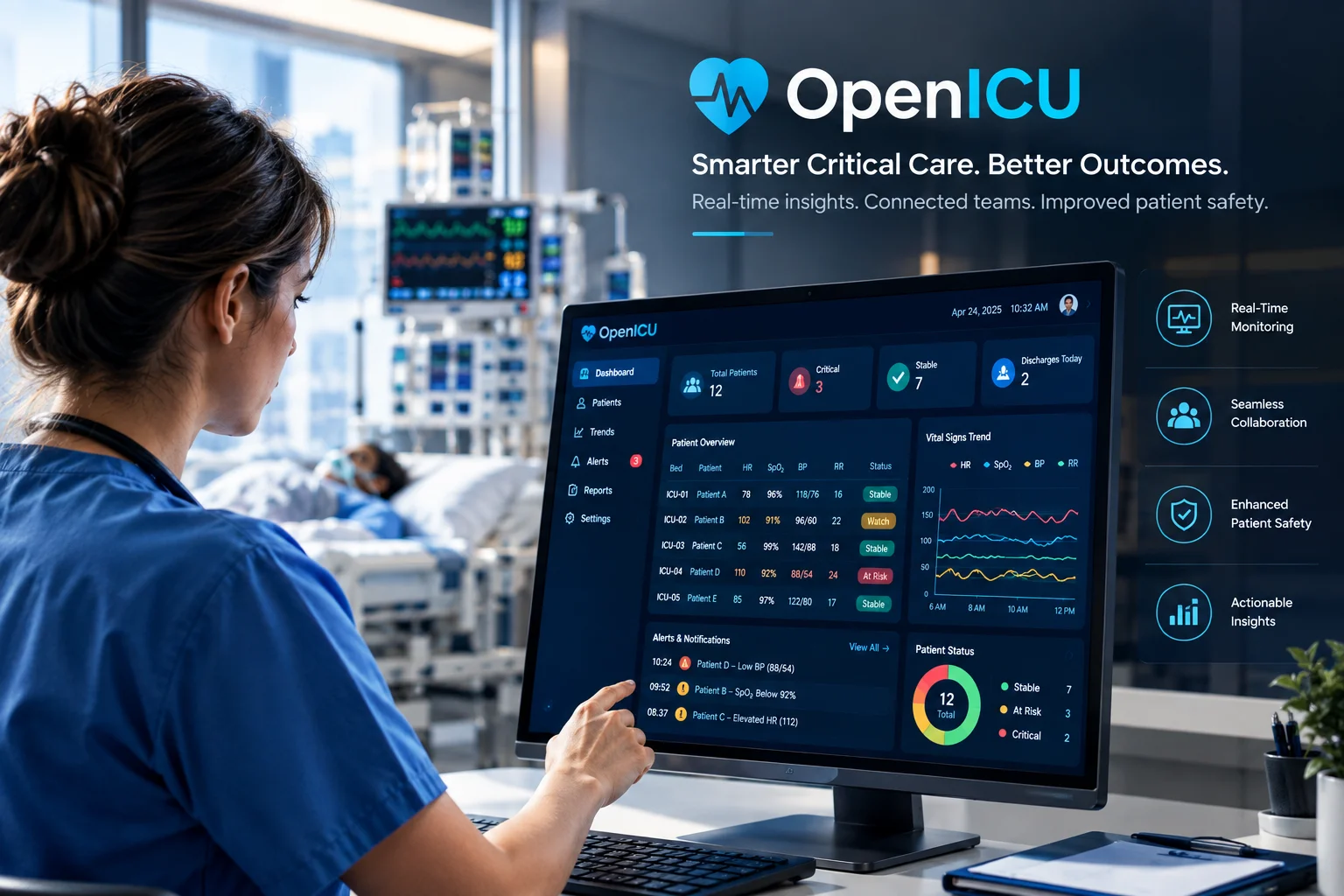
When a person becomes very sick and stays in the Intensive Care Unit (ICU), every single second matters. Doctors, nurses, and medical staff need to keep a close eye on their heart rate, breathing levels, blood pressure, and medications all at once. In the past, nurses had to walk around the room, read numbers from five different machines, and manually write them down on paper clipboards.
That is where the OpenICU software critical care dashboard changes everything.
At Software Cora, we build, test, and write about modern healthcare technology. From our hands-on experience working with hospital IT systems, we have seen how replacing old paper charts with a modern ICU patient data dashboard helps doctors make faster decisions, reduces stress for nurses, and ultimately saves lives.
Let’s take a simple, clear look at what OpenICU critical care software is, how an ICU clinical dashboard works, and why this critical care technology is transforming modern hospitals.
What Is OpenICU Software for Critical Care?
OpenICU software is an open, connected software system designed to collect health information from all ICU machines and display it clearly on one central computer screen. Instead of making doctors check separate machines for breathing, heart rate, and blood work, OpenICU critical care software pulls all that data together into one unified critical care dashboard view. Think of it like the dashboard of a car. When you drive, you don’t look under the car seat to check your speed or step outside to check your fuel level. You look at one simple screen right in front of you. An ICU patient monitoring software system does the same thing for a doctor watching over a sick patient.
+——————+ +——————+ +——————+
| Heart Monitors | | Ventilators | | Lab Reports |
+——————+ +——————+ +——————+
| | |
+————————+————————+
|
v
+—————————————-+
| OpenICU Data Integration Engine |
+—————————————-+
|
v
+—————————————-+
| Unified ICU Patient Data Dashboard |
+—————————————-+
How Does an OpenICU Critical Care Dashboard Work?
An OpenICU critical care dashboard operates as a high-speed data bridge. It connects fragmented bedside machinery directly to a central visual hub, converting raw physiological signals into instant clinical intelligence through four critical phases:
[ Bedside Telemetry ] —> [ Data Translation ] —> [ Visual Analytics ] —> [ Early Warning System ]
- ECG & Heart Rate • HL7 v2 / FHIR APIs • Widescreen Waveforms • Algorithmic Alerts
- Arterial Line Pressures • IEEE 11073 Units • Parameter Color-Coding • Predictive Risk Scoring
- Smart IV Pumps • Time-Series Syncing • 24-72h Trend Histograms • Mobile Nurse Alerts
1. Ingestion: Continuous Telemetry Ingestion
In an ICU room, a patient is typically hooked up to half a dozen standalone devices multi-parameter monitors, mechanical ventilators, continuous renal replacement therapy (CRRT) machines, and smart IV infusion pumps.
The OpenICU software connects directly to these hardware points using strict healthcare interoperability standards:
- HL7 v2 & FHIR (Fast Healthcare Interoperability Resources): Secure data protocols used to stream live patient measurements (Observation resources) straight into the system.
- IEEE 11073 Standards: Specialized device communication rules designed specifically to parse high-frequency sensor signals from point-of-care equipment without network lag.
2. Harmonization: Normalization & Time-Series Synchronization
Bedside monitors from different brands (like Philips, GE, or Mindray) output data in different formats, measurement units, and update rates. The dashboard’s backend software instantly cleans and aligns this data stream:
- Protocol Translation: Converts proprietary hardware signals into open, standardized data structures (like JSON/XML).
- Unit Normalisation: Unifies conflicting metrics such as automatically converting mmHg to kPa where required so every clinician sees standardized values.
- Time-Series Synchronisation: Syncs timestamps across all connected machines down to the exact millisecond. This allows doctors to cross-reference a sudden drop in blood pressure against the exact second an automated IV medication rate was changed.
3. Rendering: High-Density Visual Analytics
Once normalized, the software transforms rows of complex numbers into high-density visual displays across bedside monitors, central nursing station screens, and tablet devices:
- Multi-Trace Waveforms: Plots smooth, continuous high-speed signals including 12-lead ECG traces, plethysmograph lines, and invasive arterial pressure curves.
- Smart Parameter Color-Coding: Uses human-factors design principles to highlight abnormal values instantly (e.g., severe hypoxemia in flashing red, mild tachycardia in static yellow).
- Longitudinal Trend Graphs: Aggregates 24-to-72-hour vital sign histories onto a single screen so care teams can spot gradual physiological decline that single-number readings miss.
4. Intervention: Algorithmic Early Warning & Decision Support
Beyond displaying graphs, built-in Clinical Decision Support Systems (CDSS) act as a 24/7 automated co-pilot:
- Predictive Risk Scoring: Automatically runs clinical algorithms such as SOFA (Sequential Organ Failure Assessment) or MEWS (Modified Early Warning Score) by analyzing real-time trends in mean arterial pressure, heart rate, and oxygen levels.
- Contextual Alert Filtering: Uses smart noise-suppression rules to filter out false alarms (like brief sensor disconnects or patient movement artifacts), preventing “alarm fatigue” among nurses.
- Proactive Mobile Alerts: Fires targeted, actionable notifications directly to a nurse or doctor’s mobile device when early telemetry patterns indicate subtle risks of sepsis or respiratory failure.
What Features Should a Critical Care Dashboard Include?
Not all medical dashboard solutions are created equal. A high-quality critical care management system needs to include these core features:
| Feature Category | What It Does | Why It Helps the Hospital Team |
| Real-Time Vitals | Displays heart rate, oxygen levels, and body temperature continuously. | Helps nurses notice sudden health drops instantly. |
| Smart Color Alarms | Highlights emergency numbers in bright red and mild warnings in yellow. | Prevents “alarm fatigue” so nurses aren’t overwhelmed by loud beeps. |
| EHR Integration | Syncs directly with existing electronic health records software. | Saves time by eliminating the need to type patient data twice. |
| Data Visualization | Turns long lists of numbers into easy-to-read charts using healthcare data visualization. | Helps doctors spot 24-hour healing trends in just a few seconds. |
| ICU Workflow Tools | Helps organize nurse shift changes, task lists, and medication schedules. | Improves ICU workflow management so no care steps are missed. |
Is There Open Source Software for Clinic Management?
Yes, there is! Open source clinic management software and open source healthcare software have become very popular for hospitals around the world.
Popular open-source frameworks like OpenEMR, OpenMRS, and modular OpenICU software allow clinics to use world-class technology without paying millions of dollars in annual software licenses.
Because the code is free and open, hospital programmers can customize the tools, add unique clinic features, and safely store patient data on their own secure local servers.
What Are the 7 C’s of Critical Care?
The 7 C’s of Critical Care represent the core clinical principles taught in intensive care medicine. When software engineers design an ICU clinical information system or an intensive care patient management tool, they do not just build a database they digitize these seven clinical pillars to ensure the software directly enhances bedside workflows, patient outcomes, and clinical safety.
+———————————————————————————–+
| THE 7 C’s OF CRITICAL CARE |
+———————————————————————————–+
| 1. COMPASSION –> Human-Centered Care & Family Portals |
| 2. COMMUNICATION –> Real-Time Alerts & Multi-Device Messaging |
| 3. CONSISTENCY –> Digitized Clinical Protocols & Order Sets |
| 4. CONTINUITY –> Structured Shift-Handoff Dashboards (SBAR Framework) |
| 5. CAREFUL MONITORING -> Continuous Telemetry, Waveforms & CDSS Early Warnings |
| 6. COMFORT –> Sedation/Analgesia Tracking & Alarm Suppression |
| 7. COOPERATION –> Interoperable Multidisciplinary Data Hubs (EHR/Pharmacy) |
+———————————————————————————–+
1. Compassion: Human-Centered Technology
In high-stress ICU environments, technology should support never replace empathetic human care.
Clinical Principle: Treating critically ill patients and their families with dignity, empathy, and transparent communication.
Software Implementation: Modern ICU dashboards integrate with dedicated Patient & Family Communication Portals. These portals allow clinicians to securely share simplified status updates, daily care goals, and video-call links with worried family members who cannot be physically present at the bedside.
2. Communications: Instant, Low-Latency Data Flow
Critical care emergencies require rapid, error-free communication across multi-speciality teams.
Clinical Principle: Maintaining clear, immediate, and transparent information flow among doctors, nurses, pharmacists, and family members.
Software Implementation: Critical care systems embed Real-Time Notification Engines. When severe clinical anomalies occur (such as sudden arterial pressure drops), the software instantly pushes secure, role-based alerts to the primary nurse’s smart badge or mobile app, cutting communication delays from minutes to seconds.
3. Consistency: Standardized Protocol Adherence
Clinical variability increases the risk of medical errors and lengthens hospital stays.
Clinical Principle: Following standardized, evidence-based safety guidelines and clinical bundles for every procedure.
Software Implementation: Dashboards digitise Evidence-Based Order Sets & Bundles (e.g., Sepsis 1-Hour Bundles or Ventilator-Associated Pneumonia Prevention Checklists). The software tracks bundle compliance in real time and prompts clinicians if a critical safety step or lab recheck has been missed.
4. Continuity: Seamless Shift Handoffs
Miscommunication during shift transitions is one of the leading causes of preventable medical errors in ICUs.
Clinical Principle: Guaranteeing an uninterrupted, accurate transfer of patient history, treatment plans, and trajectory during shift changes.
Software Implementation: Software tools include automated SBAR (Situation, Background, Assessment, Recommendation) Handoff Dashboards. The system aggregates the last 12 to 24 hours of vital trends, active drip titrations, and pending lab results into a single visual summary, allowing oncoming nurses to review patient status in seconds.
5. Careful Monitoring: High-Frequency Telemetry Ingestion
ICU patients can deteriorate within seconds, requiring non-stop physiological oversight.
Clinical Principle: Continuously tracking and analyzing high-frequency vital signs, organ function, and diagnostic data.
Software Implementation: Backed by Clinical Decision Support Systems (CDSS), the ICU software ingests high-frequency streams from bedside telemetry (ECG, invasive arterial lines, pulse oximetry, capnography) and runs predictive scoring algorithms (like SOFA or MEWS) to flag early signs of septic shock or respiratory failure before a physical collapse occurs.
6. Comfort, Pain, Agitation, & Delirium Management
Unmanaged pain and excessive noise in the ICU drive up delirium rates and delay recovery.
Clinical Principle: Optimizing pain management, sedation, and stress control to keep bedridden patients stable and comfortable.
Software Implementation: The system incorporates Sedation & Analgesia Tracking Modules (e.g., RASS and CPOT scoring tools). Additionally, smart dashboards feature Smart Alarm Filtering to suppress false alarms (like temporary motion artifacts), reducing bedside acoustic noise and preventing both patient sleep disruption and clinical “alarm fatigue.”
7. Cooperation: Multidisciplinary Team Interoperability
An ICU patient is managed by an array of specialist intensivists, pulmonologists, clinical pharmacists, respiratory therapists, and nutritionists.
Clinical Precision: Enabling seamless collaboration across diverse medical specialties.
Software Implementation: OpenICU systems act as an Interoperable Data Hub. Using open healthcare APIs (HL7 v2 and FHIR), the platform aggregates data from the central EHR, pharmacy management systems (verifying drug-drug interactions), laboratory software, and radiology PACS into a unified daily care plan screen accessed by the entire care team.
What Is the Best Mobile App for Critical Care Medicine?
When doctors step away from the ICU bed to visit other hospital rooms, having a critical care medicine app on their smartphone keeps them connected.
The best mobile app for critical care depends on what the doctor needs to do:
- For Medical Reference & Calculators: Apps like Open Critical Care (OCC) or MDCalc give doctors free treatment guidelines, dosage math tools, and breathing calculators.
- For Live Patient Monitoring: Apps like AirStrip ONE or custom mobile tools connected to an OpenICU critical care software server allow doctors to check live heart waves on their iPhone or Android tablet securely.
What Type of Software Is Used in Healthcare?
Modern hospitals use several types of medical software for healthcare providers to keep things running smoothly:
+——————————————+
| Types of Healthcare Software |
+——————————————+
|
+——————-+——————+——————-+——————-+
| | | |
v v v v
+——-+ +———————–+ +———————–+ +——-+
| EHR | | Hospital Management | | Critical Care/OpenICU | | CRM |
| Software | Software (HMS) | | Dashboards (ICU) | | Systems
+——-+ +———————–+ +———————–+ +——-+
- EHR / EMR Software: Acts like a giant digital file cabinet that stores a patient’s lifelong health history, past surgeries, and allergies.
- Hospital Management Software (HMS): Handles room billing, staff schedules, and hospital bed supply counts.
- Critical Care & ICU Software: Displays high-speed, live vital signs for emergency rooms and ICUs.
- Healthcare CRM Software: Manages appointment scheduling, patient messages, and follow-up reminders.
What Is the Best Healthcare Software for Clinics and Hospitals?
The best hospital clinical software depends on the size of the medical facility:
For Large Enterprise Hospitals: Systems like Epic Systems and Cerner (Oracle Health) are widely used because they can handle massive multi-building medical centers.
For Small & Mid-Sized Clinics: Flexible platforms like Athenahealth, or custom setups built on open-source healthcare software, offer lower costs and simpler screens.
For Specialized ICU Departments: Dedicated healthcare dashboard software integrated with OpenICU critical care software gives doctors the fastest real-time data delivery.
How Does CRM Software Work in Healthcare?
CRM stands for Customer Relationship Management. While businesses use CRM to sell products, CRM in healthcare is used to provide a better, friendlier experience for patients.
Healthcare CRM software helps medical teams stay in touch with patients:
- Automated Appointment Reminders: Sends friendly text messages so patients don’t forget their checkups.
- Patient Portals: Gives patients a secure online page to view lab results, pay bills, and message their doctor.
- Follow-up Care: Reminds patients with chronic health conditions (like diabetes) when it is time to refill their medicine.
What Should You Look for in Critical Care Software?
Choosing a critical care management system is one of the most vital technical decisions a hospital IT team and clinical board will make. Because intensive care environments deal with high-frequency telemetry and life-or-death decision windows, an ICU platform must satisfy strict architectural, operational, and clinical criteria across four core dimensions:
+————————————————————————————+
| ICU SOFTWARE EVALUATION FRAMEWORK |
+————————————————————————————+
| 1. ZERO-LATENCY DATA PROCESSING –> Sub-second streaming & time-series syncing |
| 2. HUMAN-FACTORS UI/UX –> Cognitive load reduction & alarm filtering |
| 3. COMPREHENSIVE PRIVACY & SAFETY –> End-to-end encryption & HIPAA/BAA compliance|
| 4. DEEP INTEROPERABILITY –> Native HL7, FHIR v4, and IEEE 11073 support |
+————————————————————————————+
1. Zero Lag or Delay: Sub-Second Telemetry Processing
In an ICU, a 30-second delay or a frozen screen can hide acute hemodynamic collapse or respiratory distress.
Technical Standard: The platform must ingest, process, and render physiological streams in real time (sub-second latency).
Architecture Requirements:
High-throughput event streaming engines (such as Apache Kafka or Redis) capable of handling thousands of telemetry packets per second from bedside devices.
Time-series database infrastructure to ensure zero rendering delay when loading continuous 24-to-72-hour waveform histories.
Clinical Impact: Gives intensivists an uninterrupted, real-time view of arterial pressure lines, ECG traces, and oxygenation status during active resuscitation procedures.
2. Human-Factors UI/UX: Reducing Cognitive Load & Alarm Fatigue
Cluttered displays with dozens of competing numbers lead to missed clinical indicators and nurse burnout. Up to 89% or more of raw ICU alerts can be non-actionable, making alarm management a primary safety priority.
Technical Standard: Visual layouts engineered according to human-factors engineering principles and medical UI safety standards (e.g., IEC 60601-1-8 alarm color taxonomies).
Design Requirements:
Clean visual hierarchy featuring bold, colour-coded vital sign panels (e.g., Flashing Red for critical crises, Yellow for warnings, Green/White for stable).
Smart Alarm Suppression & AI Filtering: Algorithms that filter out minor motion artifacts and transient baseline dips to prevent clinical alarm fatigue.
Clinical Impact: Reduces screen clutter so nurses can spot a genuine physiological crisis in under 3 seconds from across the room.
3. Comprehensive Privacy & Security: Enterprise-Grade HIPAA Compliance
ICU dashboards aggregate vast amounts of Protected Health Information (PHI)—including live vitals, clinical notes, and lab histories—making them prime targets for cyber threats.
Technical Standards: Full compliance with HIPAA, GDPR, and NIST cybersecurity frameworks, backed by strict end-to-end encryption.
Security Requirements:
Encryption Standards: Advanced Encryption Standard (AES-256) for data stored on servers and TLS 1.3 for streaming data in transit.
Granular Role-Based Access Control (RBAC): Restricts data views based on role (e.g., attending physicians, bedside nurses, clinical pharmacists, administrative staff).
Comprehensive Audit Logging: Non-repudiable logs that record every user who views, edits, or exports patient records.
4. Deep Interoperability: Native Open Standard Connectors
An ICU dashboard cannot operate as an isolated data island. It must integrate with both legacy bedside hardware and modern enterprise software.
Technical Standard: Seamless, bidirectional communication built on global healthcare data standards.
Integration Protocols:
HL7 v2 & FHIR v4 (Fast Healthcare Interoperability Resources): Standardized message formats used to exchange patient demographics, lab reports, and active medication orders directly with the central Electronic Health Record (EHR) system.
IEEE 11073 Standards: Native driver integration designed to parse streaming data from heterogeneous point-of-care medical hardware (ventilators, continuous dialysis machines, smart IV pumps).
Clinical Impact: Eliminates manual data entry, saving nurses 20 to 30 minutes per shift while preventing transcription errors.
Final Thoughts
Using OpenICU software for a critical care dashboard removes the confusion of scattered machines, cuts down on tedious paperwork, and lets doctors and nurses focus on what they do best—helping critically ill patients recover safely.
At Software Cora, we build custom digital healthcare solutions, connect complex medical APIs, and help software teams build reliable, production-ready systems.
Want to contribute a software or SaaS article? Check our Write for Us guidelines.
