

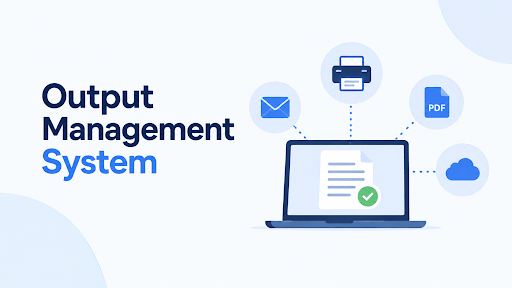
Every business system produces documents. Invoices, purchase orders, statements, policy letters, shipping labels, payslips. Somebody, somewhere, has to make sure each one looks right, reaches the right person by the right channel and can be found again two years later.
In most companies, that “somebody” is a patchwork of ERP print jobs, hand-edited PDFs, shared mailboxes and one very tired finance clerk. An output management system replaces the patchwork with one controlled process.
This guide explains what an output management system is, how it works under the hood, what to look for when you’re choosing one, and where projects tend to go wrong.
Key Takeaways
- An output management system (OMS) takes documents generated by business systems and handles their layout, personalization, routing, delivery and storage.
- It’s often called customer communications management (CCM), document output management or, in older setups, overlay printing and form design.
- The biggest gains come from fewer manual steps, consistent branding, delivery through the right channel and a searchable audit trail.
- Cloud, on-premise and hybrid options all exist. The right one depends on security rules, integrations and how much IT capacity you have.
- Choose based on your documents and workflows, not a feature list. Run a pilot with your own messiest document.
Direct answer: An output management system is software that sits between your business applications (ERP, CRM, billing, banking or insurance platforms) and your recipients. It takes raw output, formats it into finished documents, applies rules, delivers it by email, print, portal or other channels, and archives it for retrieval and audit.
What Is an Output Management System?
An output management system manages everything that leaves your business systems as a document. The application creates the data. The OMS turns it into something a person can read, sends it where it needs to go and keeps a record.
You’ll hear several names for the same idea. Customer communications management (CCM) is the broader industry term and covers marketing-style communications as well as transactional documents. Document output management and document automation are common in ERP circles. Older systems used form design or overlay printing, where a template layer sat on top of plain print output.
What ties them together is the job: control the last mile of a document’s life.
OMS vs Related Tools
People mix up these categories constantly, which makes buying harder than it should be.
| Tool | Main job | How it differs from an OMS |
| Output management system | Creates, formats, routes, delivers and archives outbound documents | Focuses on documents leaving the business |
| Document management system (DMS) | Stores, organizes and controls access to documents | Focuses on storage and collaboration, usually for documents you already have |
| Print management | Controls printers, queues, cost and usage | Handles the printing device side only |
| Robotic process automation (RPA) | Automates repetitive clicks across applications | General-purpose automation, not document composition |
| E-signature tools | Collects signatures on a document | One step in a workflow, not the workflow itself |
Many OMS products include light archiving, and many DMS products offer some output features. The point is to know which job your problem actually needs done.
How an Output Management System Works
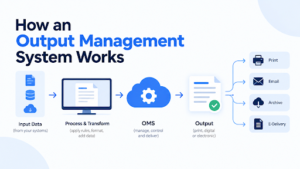
Different vendors use different words, but the flow is consistent.
- Capture. The business application sends output to the OMS. That could be a print stream, a spool file, an XML or JSON data file, or an API call.
- Parse and extract. The OMS reads the raw output, finds the data it needs (customer name, email address, invoice total, language) and splits batches into individual documents.
- Compose and transform. It merges the data into a designed template: logo, layout, terms, legal text, barcodes and signatures. Output formats are typically PDF, and often archive-grade PDF/A for long-term retention.
- Apply rules and workflow. Business rules decide what happens next. Invoices above a set value might need approval. A customer who prefers email gets email. Another gets a printed letter because that’s what the contract says.
- Distribute. The OMS sends documents through the right channel: email, secure portal, print and mail, EDI, SMS or API. Good systems handle failures too, such as a bounced email falling back to print.
- Store and retrieve. Every document, with its metadata and delivery status, goes into an archive so teams can find it later and prove what was sent and when.
A Worked Example: Customer Invoices
Here’s a fictional mid-sized distributor, Harlow Supply Co., to show the difference.
Before. The ERP generates invoices as plain-text print runs. Finance staff export them, apply a logo in a separate tool, email each PDF by hand and print the rest. When a customer says “I never got it,” nobody can prove either way. Changing the invoice layout needs a developer and a long queue.
After. The ERP sends invoice data to the OMS. The system builds a branded PDF from a template that finance edits without code, picks email or print based on each customer’s preference, sends invoices over a set value to a manager for approval first, and archives every copy with a delivery receipt. When the “never got it” call arrives, support finds the sent record in seconds.
Nothing about the invoice data changed. The control around it did.
Key Features to Look For
Not every feature matters to every business. These are the ones that separate useful systems from shelfware.
Template design without coding. Business users should be able to adjust layouts and text. If every change needs a developer ticket, you’ve just moved the bottleneck.
Rules and workflow engine. Conditional logic, approvals, routing by region, language or customer type.
Multi-channel delivery. Email, print, portals, API, and fallback handling when a channel fails.
Personalization and multilingual output. Variable data, language selection and local formats for dates, currency and legal text.
Archiving and retrieval. Searchable storage with metadata, retention rules and delivery logs.
Integration. Native connectors or reliable APIs for your ERP, CRM, billing and core systems. Ask for references on your specific platforms.
Security and compliance. Role-based access, encryption in transit and at rest, audit trails, and controls that support regulations such as GDPR or industry rules in healthcare and finance.
Monitoring and reprocessing. Dashboards that show what failed, and the ability to resend without redoing everything.
Benefits of an Output Management System
The benefits are practical, and some are easy to measure.
Less manual handling. Fewer exports, downloads, attachments and hand-typed emails.
Consistent branding and accuracy. Every document follows approved templates, which cuts errors and off-brand output.
Faster delivery. Documents leave the moment they’re ready, which can speed up payment cycles for invoices.
Lower print and postage cost. Digital delivery where customers accept it, and smarter batching for what still needs to be mailed.
Auditability. You can prove what was sent, to whom and when. That matters in disputes and audits.
Flexibility. Change a template once, and every future document follows it, without touching the source application.
A fair caveat: these gains depend on how well the project is scoped. A badly configured OMS automates mistakes at scale.
Who Uses Output Management Systems
Any organization that sends large volumes of structured documents.
Finance and accounts receivable teams use them for invoices, statements and reminders. Logistics and manufacturing firms send purchase orders, delivery notes, certificates and labels. Insurers produce policies, renewals and claims letters. Banks send statements and regulatory notices. Healthcare providers handle patient correspondence under strict privacy rules. Utilities and telecoms bill millions of customers.
If you’re an ERP user whose standard documents look dated and can’t be changed without custom coding, that’s the classic entry point.
Deployment Options: Cloud, On-Premise or Hybrid
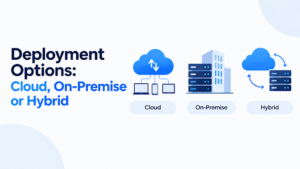
Cloud means faster setup, lower infrastructure work and easier scaling. It suits teams without a large IT department. Check data residency, uptime commitments and how it connects to systems behind your firewall.
On-premise gives you direct control, which some security policies and legacy integrations require. The trade-off is hardware, upgrades and maintenance.
Hybrid keeps sensitive processing or archives in-house while using cloud delivery or design tools. It’s common in larger, regulated organizations.
There’s no universally correct answer. Start from your security requirements and your integrations, then work backward.
How to Choose an Output Management System
Start With Your Documents
List your document types, volumes, channels and the systems that generate them. Mark the ugliest one: the invoice with 40 variants, the multilingual contract pack, the batch that breaks every month. That’s your test case.
Questions to Ask Vendors
- Which of our source systems do you integrate with, and can you show a live example?
- Who edits templates after go-live, and how technical do they need to be?
- How do you handle delivery failures and reprocessing?
- Where is data stored, for how long, and who can access it?
- What does implementation involve on our side, and who from your team stays involved?
- How is pricing structured: by volume, users, modules or channels?
- Can we speak to a customer with similar documents and systems?
Red Flags
- A demo that uses only perfect sample data.
- Vague answers about integration with your specific ERP.
- Pricing that stays unclear until late in the process.
- No clear plan for migrating existing templates.
- No customers you can contact.
Run a Pilot
Ask for a pilot using your real, messy document. If a vendor won’t do that, notice it. And if you’d like a structured way to compare vendors, our research dossier guide shows how to build a sourced, dated evaluation file for any company you’re considering.
Cost Factors
Prices vary widely, and any figure quoted without your volumes and requirements is a guess. These are the factors that drive the total:
- Licensing or subscription model (by volume, user, module or channel)
- Implementation and integration work
- Template migration and design
- Training and change management
- Infrastructure (for on-premise) or hosting (for cloud)
- Ongoing support and upgrades
- Delivery costs such as print and postage, which you may be reducing
Ask for a total cost of ownership over three to five years, not just the first-year price.
Implementation: What a Sensible Rollout Looks Like
- Inventory your documents and rank them by volume and pain.
- Pick a first use case with clear value and manageable complexity, such as invoices.
- Design templates and rules with the people who actually use the documents.
- Integrate and test with real data, including edge cases and failures.
- Pilot with a small group or customer segment.
- Roll out in phases, adding document types and channels once the first is stable.
- Monitor and refine. Track delivery success, errors and time saved.
Typical timelines vary by scope, from weeks for a single document type to many months for enterprise-wide programs.
Common Mistakes
Automating a broken process. If approvals are chaotic today, automation makes them chaotic faster. Fix the process first.
Trying to do everything at once. Start narrow.
Ignoring the humans. Some documents need review. Build in approval steps where judgment matters, instead of pretending everything can be fully automatic.
Underestimating integration. The OMS is only as good as its connection to your source systems.
Forgetting retention rules. Decide how long archived documents live and who can see them before go-live.
Neglecting monitoring. Silent failures are the worst kind. Someone should own the dashboard.
Trends Worth Watching in 2026
E-invoicing mandates. More countries now require or encourage structured electronic invoices. Check whether your vendor supports the formats and networks you’ll need.
API-first and composable setups. Instead of one monolithic system, teams assemble services for composition, delivery and archiving.
AI-assisted features. Vendors are adding AI for data extraction, template suggestions and search. Treat these as helpers, test them on your documents and keep human review for anything high-stakes. If you’re comparing tools more broadly, our AI software reviews are a starting point.
Omnichannel delivery. Customers expect to choose email, portal, mobile or paper, and to change their mind.
Tighter privacy expectations. Retention, access control and audit logs get more attention every year.
Where This Fits in Your Software Stack
An OMS rarely lives alone. It connects to your ERP and billing system, often to your CRM, and sometimes to payment and portal tools. If you’re mapping out the wider stack, see our business software guides, and for the customer-data side, our comparison of CRM tools for growing B2B companies and the best CRM for a small B2B sales pipeline.
FAQs
What is an output management system?
Software that formats, personalizes, routes, delivers and archives the documents your business systems produce, such as invoices, purchase orders, statements and letters.
What does OMS stand for in business software?
Output management system. Don’t confuse it with order management systems or other uses of the same abbreviation.
What’s the difference between OMS and CCM?
CCM (customer communications management) is the broader category, covering transactional and marketing-style communications. Output management is often the document-delivery core of it.
Is an output management system the same as a document management system?
No. A DMS stores and organizes documents. An OMS creates and delivers outbound documents, and usually archives them too.
Which business systems does an OMS connect to?
Commonly ERP, CRM, billing, banking, insurance and logistics platforms, through print streams, files or APIs.
What are the main benefits?
Less manual work, consistent branding, faster delivery, lower print and postage costs, and an audit trail.
Cloud or on-premise: which is better?
Neither wins by default. Cloud suits quicker, lighter setups, on-premise suits strict control needs, and hybrid blends both.
How long does implementation take?
From weeks for a single, simple document type to many months for large, multi-system programs. Scope drives the timeline.
How much does an output management system cost?
It depends on volume, modules, channels and implementation. Ask vendors for a multi-year total cost, based on your documents.
Can an OMS handle print and digital together?
Yes. Most systems support print, email and portal delivery with rules for choosing the channel and fallbacks if one fails.
Final thought
An output management system is worth it when documents are a real operational burden: high volume, many formats, compliance exposure, or constant requests to change layouts that your ERP can’t easily handle.
It’s overkill if you send a handful of simple documents a week.
If you’re in the first group, pick one painful document, build the case around it and test vendors on your actual data. The right system makes document delivery boring, and boring is exactly what you want.
Write for SoftwareCora
Share your expertise with SoftwareCora’s audience through a high-quality guest post on AI, SaaS, software, CRM, business technology, or digital marketing.

1 Comment
Pingback: Business Automation and AI Solutions in Malaysia (2026)