

Picture a normal Tuesday. A developer merges a small fix, the pipeline goes green, and the change ships. By Wednesday morning, reports are stale, a fraud check is timing out, and three people are asking the same question in the incident channel: what changed?
If answering that takes an hour of detective work, you don’t have a change control problem on paper. You have one in practice. And if an auditor asks the same question six months later, you want an answer that takes thirty seconds and doesn’t depend on anyone’s memory.
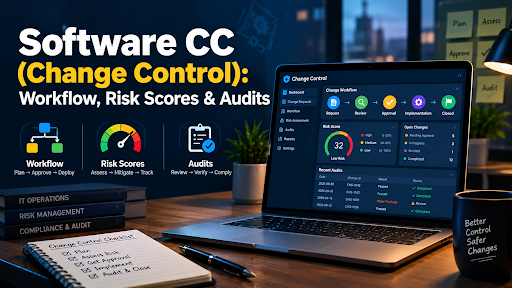
That is what software CC is for. This guide covers the lifecycle, the vocabulary, a risk scoring model you can adapt, a Git-based setup with real configuration snippets, special cases that trip teams up, metrics, tools and a compliance mapping that matches the current versions of the standards. It also covers the part most guides skip: how to keep all of this light enough that engineers don’t route around it.
What Software CC Means (and What It Doesn’t)
Software change control, shortened to software CC, governs how a change moves from “someone wants this” to “it’s running in production,” and how the evidence of that journey is kept. The core question never changes: who approved this change, and why?
The abbreviation is crowded, so a quick disambiguation helps:
- Software CC in this guide is change control.
- CC in a video context usually means closed captions.
- CC in a design context often means Adobe Creative Cloud.
- CC in a licensing context means Creative Commons, which, incidentally, its own organization advises against using for software code.
Now the terms that get mixed up inside the engineering world:
| Term | The question it answers |
| Version control (Git) | What changed in the code, and when? |
| Change control (software CC) | Who asked for the change, who approved it, and was it reviewed against risk? |
| Change management / change enablement | How does the organization steer change overall, including people, process and communication? ITIL 4 uses the term change enablement. |
| Release management | When and how do approved changes reach users? |
| Configuration management | What is the current, intended state of systems and settings? |
They overlap, and plenty of teams treat them as one function. The distinction still helps when you build the process: version control gives you the what, change control gives you the why and who.
Why Software CC Matters More Than It Used To
Ten years ago, most teams released on a schedule, and change control meant a spreadsheet, a weekly meeting and a lot of waiting. Today a single configuration push can alter a production system in seconds. Deployments happen many times a day, infrastructure is code, and a growing share of code is written with AI assistants.
Three pressures meet in the same place:
- Speed. Developers want to ship without waiting for meetings.
- Stability. Operations teams want fewer 3 a.m. incidents, and most incidents trace back to a recent change.
- Proof. Auditors, customers and regulators want evidence that changes were authorized, tested and documented.
The old model forces a trade between the first and the other two. A modern model removes the trade by automating the routine parts and reserving human attention for the changes that deserve it.
One honest caveat before we go further: you will see many articles quoting precise “industry benchmarks” for change control, such as a specific percentage drop in downtime. Treat those with suspicion unless the methodology is published. This guide gives you a method and the metrics to measure your own improvement, because your baseline is the only number that matters.
- Explainers and reviews across the tech world: Technology
- Tools for running and managing teams: Business Software and Productivity Software
The Five-Stage Change Lifecycle
Every change control system, however automated, moves through the same five stages. Skip one and you lose traceability.
1. Request
Someone opens a change request. In a modern setup this is usually a pull request linked to a ticket, or an infrastructure change proposal. The request should state what is changing, why, and what it touches.
2. Assessment (impact and risk)
The change is evaluated for blast radius, dependencies, data sensitivity, reversibility and test confidence. This is the stage most often skipped, and it is the one most incidents trace back to. Assessment can be done by a person, by an automated scoring rule, or both. The next sections show how.
3. Approval
A reviewer, an automated gate or a Change Advisory Board (CAB) signs off. The approval must be recorded with identity and timestamp, and the approver should not be the sole author of the change.
4. Deployment
The change ships through a controlled pipeline, ideally to staging first, then to production. The deployment should be tied to the exact commit or artifact that was approved, so there is never any doubt about what is running.
5. Post-implementation review
After release, the team confirms the outcome: did the change work, did any health check fail, was a rollback needed? Closing the loop is what makes the next change safer. For routine changes this can be automatic. For failed or high-risk changes, it should include a short human review.
Standard, Normal and Emergency Changes
ITIL 4’s change enablement practice sorts changes into three types, and this single idea is what makes software CC workable at scale:
- Standard changes are low-risk, well understood and pre-approved. Think of a routine dependency bump with passing tests, or a documented configuration toggle. They follow a defined procedure and skip case-by-case approval.
- Normal changes need assessment and authorization. Most meaningful changes live here, and the depth of review scales with risk.
- Emergency changes fix an urgent problem, such as a live outage or a critical vulnerability. They move fast and are reviewed after the fact, but they are never undocumented.
Traditional change control vs continuous delivery
Classic ITIL-style control assumes changes are rare and risky, so it builds in heavy manual review. Continuous delivery assumes changes are frequent and mostly small, so it builds in automation.
| Attribute | Traditional (CAB-centered) | Continuous delivery model |
| Change frequency | Weekly or monthly batches | Many small changes per day |
| Approval | CAB meeting for most changes | Automated gates plus selective human review |
| Documentation | Written by hand | Generated from Git and pipeline metadata |
| Rollback | Manual, often slow | Automated, tied to health checks |
| Audit trail | Tickets and meeting minutes | Linked commits, approvals and deployment logs |
| Best fit | Legacy or tightly regulated monoliths | Cloud-native services and microservices |
Most real software CC setups are a hybrid. A payments platform might auto-approve small front-end fixes while sending database schema changes to a named approver. That mix is healthy.
A Risk Scoring Model You Can Actually Use
Sending every change to a CAB doesn’t scale, and it wears reviewers down until they approve on autopilot. The fix is to score changes automatically and route them by risk.
A word on honesty first. There is no standard formula for this, and anyone who presents one as universal is guessing. Some published models combine “lines changed” with a service rating and subtract test coverage, but mixing units that way produces numbers that are hard to explain to an auditor or a developer. A better approach is a simple additive score built from factors people can understand and argue about. Treat the model below as a starting point and calibrate it against your own incident history.
The six factors
| Factor | Scale | What it measures |
| Blast radius | 1 to 5 | How critical is the service? 1 is an internal tool, 5 is revenue-critical or safety-critical |
| Data sensitivity | 0 to 3 | 0 none, 1 internal, 2 personal data, 3 regulated data such as payments or health |
| Change size | 0 to 3 | 0 trivial or flag flip, 1 small, 2 medium, 3 large or cross-cutting |
| Reversibility | 0 to 3 | 0 instant rollback, 1 automated rollback in minutes, 2 manual rollback, 3 effectively irreversible |
| Test confidence | 0 to 3 | 0 strong tests and a canary, 1 moderate, 2 weak, 3 none |
| Timing and context | 0 to 2 | 0 normal, 1 near peak traffic, 2 during a freeze or an active incident |
Add the six numbers. The maximum is 19.
Routing by score
| Score | Tier | What happens |
| 0 to 5 | Low | Auto-approved by the pipeline once checks pass |
| 6 to 10 | Medium | One independent peer approval plus automated static analysis and test evidence |
| 11 and above | High | Named approver or CAB review, staging validation and a written rollback plan |
Add two override rules, because totals can hide danger:
- Any change that touches authentication, payments, encryption, access control or production data schemas is at least Medium, regardless of score.
- Any change with a reversibility of 3 is High, regardless of score.
Three worked examples
- A three-line fix in an internal admin tool, strong tests. Blast radius 1, data 0, size 0, reversibility 0, tests 0, timing 0. Score 1. Low. It ships on its own.
- A 400-line refactor of the payments service, thin tests. Blast radius 5, data 3, size 3, reversibility 1, tests 2, timing 0. Score 14. High. It waits for a named approver and staging validation, and it should.
- A migration that drops a column in the orders table. Blast radius 4, data 2, size 1, reversibility 3, tests 1, timing 0. Score 11, and the irreversibility override fires too. High.
A small example in code
def risk_tier(blast, data, size, reversibility, test_gap, timing,
touches_sensitive_path=False):
“””Return (score, tier). Inputs follow the six-factor scales above.”””
score = blast + data + size + reversibility + test_gap + timing
if reversibility == 3 or score >= 11:
tier = “high”
elif score >= 6 or touches_sensitive_path:
tier = “medium”
else:
tier = “low”
return score, tier
Wire this into a required status check so the pipeline posts the score and tier on every pull request. Where inputs cannot be computed automatically (such as service criticality), store them in a catalog file next to the service, and let test-coverage and change-size inputs come from the pipeline.
This model does not remove human judgment. It points human attention at the changes that deserve it, instead of spreading reviewers thin across every commit.
- AI tooling and its impact on software work: AI Software
- Catch bugs before release: API Testing Strategies: 9 Moves That Catch Bugs Before Your Users Do
Building an Audit-Ready Pipeline Step by Step
The most common reason audits go badly is not a lack of control. It is that evidence lives in two disconnected systems, a ticket tool and a Git host, and nobody can connect them. So start with your Git provider.
Step 1: Link every change to a ticket
Require a ticket ID in every commit message or pull request title, and enforce it with a check. A lightweight pull request template keeps the information consistent:
## What and why
<!– One or two sentences. Link the ticket: PROJ-123 –>
## Risk inputs
– Service criticality (1-5):
– Data sensitivity (0-3):
– Reversibility (0-3):
– How was this tested?
## Rollback plan
<!– How do we undo this, and how long does it take? –>
Step 2: Protect the main branch
Configure branch protection or repository rulesets so the rules are enforced by the platform, not by good intentions. On GitHub, the relevant options include requiring pull requests before merging, requiring approving reviews, dismissing stale approvals when new commits arrive, requiring approval of the most recent reviewable push, requiring review from code owners, requiring status checks to pass, and optionally requiring signed commits. GitLab and Azure DevOps offer equivalents.
Step 3: Use code owners for sensitive paths
A CODEOWNERS file turns “this area needs a specialist” into an enforced rule:
# Payments and auth always get a specialist review
/services/payments/ @acme/payments-leads
/services/auth/ @acme/security-reviewers
# Infrastructure and database migrations
/infra/ @acme/platform-team
/db/migrations/ @acme/dba-reviewers
Step 4: Add a required risk check
Add a pipeline job that computes the risk tier and fails the check when the required approvals for that tier are missing. This is where the earlier scoring model connects to enforcement.
Step 5: Record every approval immutably
Who approved, when, and against which commit. Git hosting platforms record review events, and your pipeline should copy approval and deployment events into a log store that administrators cannot quietly edit. Append-only storage, object-lock buckets or a dedicated audit-log service all work.
Step 6: Tag deployments with the exact artifact
Every deployment should record the commit SHA or image digest that shipped. Then “what is running in production?” has one answer, and rollback always targets a known-good version.
A change record that works
Whatever tool you use, the record should hold roughly this much, and nothing in it should require manual typing:
{
“change_id”: “CHG-2026-1042”,
“ticket”: “PROJ-123”,
“type”: “normal”,
“commit_sha”: “9f3c2ab”,
“author”: “dev.a”,
“approvers”: [“dev.b”, “payments-lead”],
“risk”: { “score”: 14, “tier”: “high” },
“tests”: “all required checks passed”,
“deployed_at”: “2026-10-07T14:32:00Z”,
“outcome”: “success”,
“rollback_used”: false}
Set this up once and your software CC records save days at your next audit.
Separation of Duties Without Slowing Anyone Down
Separation of duties (SoD) means the person who writes a change cannot be its only approver. Auditors check this constantly, and small teams are the ones who trip over it.
You don’t need a compliance department to satisfy it. Require at least one approving reviewer who isn’t the author, enforce it in branch protection, and add “approval of the most recent push” so someone can’t get an approval and then add unreviewed commits. Pair that with automated static analysis and you cover both the human and machine layers of review without a single extra meeting.
The one place SoD gets awkward is the two-person team. If both people write code, review each other’s work, and keep the tooling enforcing it. If you’re a solo founder, document the compensating controls: automated tests, deployment logs and an outside review for high-risk changes.
-
What happens when a small change ripples through a payment stack: SOA OS23 Explained
Automating Tickets and Status Through Webhooks
Manual ticket updates are where change control processes quietly die. Engineers forget, tickets go stale, and auditors find gaps. Event-driven updates fix that:
- A pull request opening creates or updates the linked change ticket.
- A merge moves the ticket to “in deployment.”
- A successful production deploy closes the ticket and attaches the deployment log.
- A failed deploy or rollback reopens the ticket and flags it for review.
When this runs on its own, your ticket system becomes a live mirror of what actually happened, not a chore someone updates once a week.
Emergency Changes Without the Chaos
Emergencies are where a lot of good processes collapse, because someone is under pressure and the “right way” feels too slow. The answer isn’t to ban fast action. It is to make fast action leave a trail.
A workable emergency path looks like this:
- Declare it. An on-call engineer or incident commander marks the change as an emergency, which opens a ticket automatically.
- Allow a break-glass route. Permit a named group to bypass normal approvals, and log every use of that bypass.
- Do the minimum safe thing. Fix the problem, not everything near it.
- Review afterward. Within a defined window, such as one or two business days, a second person reviews what was done, and the ticket is completed.
- Count them. Track the number of emergency changes. A rising trend means your normal path is too slow or your quality is slipping.
The failure to avoid is the ghost change: a modification that reaches production and never generates a record, such as a quick patch applied by logging into a server during an incident. Auditors treat ghost changes as a serious finding. Close the gap by making emergency work auto-create a retroactive ticket, and by restricting direct production access so the pipeline is the easiest route anyway.
Infrastructure, Databases, Dependencies and AI-Written Code
Application code is only part of what changes in production. A solid software CC process covers the rest.
Infrastructure as code. Terraform files, Kubernetes manifests and network configurations should follow the same request, approval and deployment lifecycle as application code. Policy-as-code tools can block risky patterns, such as an open security group, before they apply.
Database changes. Schema changes are among the riskiest because they are often hard to reverse. Prefer the expand-and-contract pattern: add the new structure first, migrate data, switch the application, and only later remove the old structure. Each step is reversible until the last one. In the scoring model above, a destructive migration scores high on reversibility for exactly this reason.
Dependencies and third-party updates. Automated dependency updates are changes too. Low-risk patch bumps with passing tests can be standard changes. Major version upgrades and anything touching security libraries deserve normal review. Vendor-side changes you can’t see, such as a SaaS provider altering behavior, are harder; monitor their release notes and keep a rollback or fallback path where it matters.
Feature flags. Flags separate deploying code from releasing it, which can make risky changes safer. They also create a change-control blind spot if flag flips go unrecorded. Treat production flag changes as changes: log who flipped what and when.
AI-generated code. Assistants now write meaningful portions of many codebases, and they can produce plausible-looking changes quickly. Change control doesn’t need a new process for them, but it does need the existing one to hold: the same required reviews, tests and risk scoring apply regardless of who or what wrote the diff. If anything, volume goes up, which is one more reason to automate routing so reviewers aren’t buried. If your team is exploring AI tooling more broadly, our AI Software section covers the options.
Rollback, Roll-Forward and Safe Releases
Change control is only half of safety. The other half is being able to undo or contain a bad change quickly.
- Rollback returns to the previous known-good version. It’s fast when deployments are artifact-based and the database is compatible with both versions.
- Roll-forward ships a fix instead of reverting. It’s often the better choice when the change includes irreversible data changes.
- Canary releases send a small share of traffic to the new version first and watch health signals.
- Blue-green deployments keep the old environment running so you can switch back instantly.
- Automated rollback triggers on health checks, such as error rate or latency thresholds, so recovery doesn’t depend on a human noticing.
Whichever you choose, put the rollback plan in the change record, and test it. A rollback procedure nobody has ever executed is a hope, not a plan. Testing also belongs earlier in the chain; our guide to API testing strategies shows how to catch problems before they reach this stage.
Metrics That Tell You If Software CC Is Working
If you can’t measure it, you can’t tell whether software CC is helping or just adding ceremony. Start with the widely used delivery metrics from the DORA research program: deployment frequency, lead time for changes, change failure rate and time to restore service (recent DORA reports refer to the last one as failed deployment recovery time). Then add a few that are specific to change control:
| Metric | Why it matters |
| Change failure rate | Share of changes that cause incidents or need remediation; the clearest quality signal |
| Emergency change share | A rising share suggests the normal path is too slow or quality is slipping |
| Untracked change rate | Production changes found with no ticket; this should trend toward zero |
| Approval latency | Time changes wait for review; long waits push people to bypass the process |
| Rollback rate | How often deployments are reverted |
| Audit prep time | Hours spent gathering evidence per audit period |
Record a baseline before you change anything. After a quarter of the new process, compare. Improvements in untracked changes and audit prep time usually show up first. Failure-rate changes take longer and need enough volume to be meaningful.
Tools: What to Look For
Rather than ranking products, here’s the checklist that matters, followed by the typical building blocks.
Evaluate these capabilities directly, not from a marketing page:
- Native Git integration that links commits, pull requests and change tickets automatically.
- Configurable risk scoring so low-risk changes don’t wait for a human.
- Immutable or tamper-evident audit logs.
- Rollback automation driven by health checks.
- API and webhook support for ticketing, chat alerts and status syncing.
- Exportable evidence reports mapped to the frameworks you’re audited against.
If a platform can’t do the first two, keep looking.
Typical building blocks:
- Source and review: GitHub, GitLab or Azure DevOps for pull requests, branch rules and approvals.
- Ticketing and change records: Jira Service Management, ServiceNow or a lighter issue tracker for smaller teams.
- Deployment and GitOps: Argo CD, Flux, Spinnaker or your cloud provider’s native pipelines.
- Policy as code: Open Policy Agent or Terraform’s policy tooling to enforce rules before changes apply.
- Log and evidence storage: Append-only or object-lock storage for approvals and deployment records.
For a small team, a Git host with enforced rules plus an issue tracker is enough. Don’t buy a heavyweight platform to solve a problem a pull request template and branch protection already handle. For broader tool comparisons, see our Business Software and Productivity Software sections.
Compliance Mapping: Which Control Does Software CC Satisfy?
Auditors don’t care how elegant your pipeline looks. They care whether your records prove control. Here is how software CC maps to the frameworks teams are most often asked about. Check the current text of each standard for your audit, since versions and numbering change.
| Framework | Relevant control | What it asks for | What your software CC evidence shows |
| SOC 2 | CC8.1 (change management) | Changes to infrastructure, data, software and procedures are authorized, tested, approved and documented | Linked tickets, required reviews, test results and deployment logs |
| SOC 2 | CC6.8 | Controls to prevent or detect unauthorized or malicious software | Protected branches, code review and scanning (related, but not the main change-management criterion) |
| ISO/IEC 27001:2022 | Annex A 8.32 (change management) | Changes to information processing facilities and systems follow a formal change process | A documented lifecycle with recorded approvals and rollback plans |
| ISO/IEC 27001:2013 | A.12.1.2 and related controls | Older numbering; replaced by 8.32 in the 2022 edition | Use only if you’re still on the legacy edition |
| NIST SP 800-53 | CM-3, CM-4, CM-5 | Configuration change control, impact analysis, access restrictions for change | Approval gates, risk assessment records and restricted production access |
| PCI DSS | Change control requirements under Requirement 6 | Documented, authorized and tested changes to system components in the cardholder environment | Ticket-to-commit linkage and approval records |
| HIPAA Security Rule | 164.312(c)(1) integrity | Protect electronic health information from improper alteration | Tamper-evident logs and controlled change paths |
| SOX (ITGC) | Change management domain | Authorized, tested and approved changes to financial systems | Segregation of duties and approval evidence |
A practical note: SOC 2 and ISO 27001 auditors generally care about demonstrated control and evidence, not about whether you hold a CAB meeting. A well-configured pipeline that enforces peer review, runs tests and produces immutable deployment logs is a strong answer. HIPAA doesn’t use the phrase “change control” explicitly, so the mapping above is an interpretation, not a quotation.
One correction worth making, because it appears in many guides: the SOC 2 criterion most directly about change management is CC8.1, not CC6.8, and ISO 27001’s change-management control is A.8.32 in the 2022 edition, which replaced the 2013 numbering.
Generating an audit evidence pack
Automate a report that includes, for the audit period:
- every change ticket opened,
- the linked commit SHA and pull request for each,
- approver identities and timestamps,
- the risk score and tier assigned at request time,
- test and scan results,
- deployment outcome, including any rollback events,
- the list of emergency changes and their after-the-fact reviews.
Schedule it. When an auditor asks for a quarter’s worth of data, you should hand it over in minutes, not days. Auditors typically sample from the population, so also be ready to show that the whole population is covered, not just the changes you hand-picked.
A Maturity Model for Software CC
Use this to see where your software CC practice stands and what to do next.
- Level 1: Ad hoc. Changes ship from laptops, approvals happen in chat, and nobody can say exactly what’s in production. Next step: link commits to tickets and protect the main branch.
- Level 2: Documented. There’s a written process and a CAB, but evidence is collected by hand and the CAB reviews everything. Next step: tier changes by risk and stop sending low-risk changes to meetings.
- Level 3: Automated. Branch rules, required checks, risk routing and webhooks produce records automatically. Next step: add automated rollback and a regular metrics review.
- Level 4: Continuously improving. Metrics drive process changes, emergency changes are rare and reviewed, and audit evidence is a scheduled export. Next step: keep recalibrating the risk model against real incidents.
A 30-60-90-Day Rollout Plan
You don’t need to rebuild everything at once.
Days 1 to 30: get traceability. Require a ticket ID in every change. Turn on branch protection and a required independent reviewer. Tag deployments with the commit or image digest. Record your baseline metrics.
Days 31 to 60: add routing and automation. Introduce the risk score, even a rough one. Auto-approve the low tier. Add webhooks so ticket status updates itself. Define the emergency path and the break-glass log.
Days 61 to 90: prove it. Generate your first automated evidence pack. Review the emergency changes and untracked changes found so far. Calibrate the risk model against incidents. Compare metrics with the baseline and share the results with engineers and compliance alike.
Common Pitfalls and Anti-Patterns
The rubber-stamp CAB. When every change funnels through the same meeting, reviewers stop reading carefully. Fix it by tiering and reserving human time for changes that need it.
Merge is not deploy. Some teams merge to main and assume it’s the same as deploying. If merge and deploy aren’t tightly linked, you can’t say which commit is running. Tag every deployment with its exact commit or artifact and never deploy from an unrecorded state.
Ghost changes and untracked hotfixes. Covered above: restrict direct production access and make the emergency path auto-create a record.
Ticket theater. Tickets filled with “update” or “fix stuff” satisfy a checkbox and help nobody. Require a reason and a rollback note on anything above the low tier.
Approval by the author. Self-approval, or approval of a version that later changed, breaks separation of duties. Enforce independent review and approval of the latest push.
Screenshot evidence. If your audit evidence is a folder of screenshots, it can’t be trusted or reproduced. Export from the system of record.
Over-tiering. If 80 percent of changes land in High, nobody is calibrating the model, and engineers will start gaming the inputs. Review the distribution monthly.
Process nobody can follow in an emergency. If the right way takes forty minutes and the outage costs a thousand dollars a minute, people will route around it. Design the emergency path in advance.
Software CC for Small Teams
If you have five engineers and no compliance staff, you still need software CC. You just need the lightweight version:
- Protect the main branch and require one independent review.
- Link every change to a ticket or issue.
- Keep deployment logs and tag releases with the commit.
- Write a one-page policy that defines standard, normal and emergency changes.
- Review emergency changes at the next team meeting.
That covers most of what a customer security questionnaire or a first SOC 2 audit will ask. It also takes an afternoon, not a quarter.
FAQs
What does software CC stand for?
Software change control. In other contexts, CC can mean closed captions, Creative Cloud or Creative Commons, but in engineering and compliance it means the process that governs changes to software and systems.
How is software change control different from version control?
Version control, such as Git, records what changed in the code. Change control records the decision around that change: who requested it, who approved it, what risk was assessed and what happened after deployment.
Is change control the same as change management?
They overlap. Change control usually refers to the approval and tracking mechanics. Change management, or change enablement in ITIL 4 terms, is the broader practice including communication and organizational impact.
Do small teams need formal change control?
Yes, in a lightweight form. Even a two-person team benefits from knowing which commit caused an incident and who approved it.
Does change control slow deployments down?
Only if it’s built badly. Automated risk scoring and tiered approvals usually speed teams up, because low-risk changes stop waiting for unnecessary review.
Do I need a CAB?
Not for every change. A CAB, or a named approver group, makes sense for high-risk changes. SOC 2 and ISO 27001 ask for controlled, evidenced change, not for meetings.
What’s the fastest way to become audit-ready?
Link every change to a ticket, enforce an independent reviewer through branch protection, tag deployments with the commit, and export evidence from your tools instead of assembling it by hand.
Does it apply to infrastructure and configuration?
Yes. Terraform files, Kubernetes manifests, network rules and feature-flag changes should follow the same request, approval and deployment lifecycle.
What about emergency fixes?
Allow them, but record them. Use a break-glass path, log its use and review the change afterward within a defined window.
Which SOC 2 control covers change management?
CC8.1, which covers authorization, testing, approval and documentation of changes. CC6.8 is a related but different criterion about unauthorized or malicious software.
Which ISO 27001 control covers it?
Annex A 8.32 in the 2022 edition. The 2013 edition spread similar requirements across several controls, including A.12.1.2.
Can AI-generated code go through the same process?
It should. The same reviews, tests and risk scoring apply regardless of who or what wrote the change.
How do I measure whether it’s working?
Track change failure rate, emergency change share, untracked change rate, approval latency and audit prep time against a baseline you recorded beforehand.
What’s the biggest mistake teams make?
Sending every change through the same heavy review. It tires reviewers, slows delivery and doesn’t make the risky changes any safer.
Conclusion
Software change control isn’t a compliance checkbox. It’s the difference between a team that finds and fixes problems in minutes and one that spends an hour working out what changed.
Build the five-stage lifecycle. Score changes automatically so humans only review what matters. Enforce independent review in your Git platform instead of in a policy document. Tag every deployment with the exact artifact that shipped. Make emergencies fast but never invisible. Then measure against your own baseline and let the numbers tell you where to tighten or loosen.
Start small if you need to. Linking commits to tickets this week puts you ahead of teams still running change control through email threads and spreadsheets. The rest can follow in stages.
Last updated October 2026. Standards and platform features change, so check the current text of each framework and the documentation for your tools before an audit.
Write for Us
Do you test gadgets, build desk setups or explain tech in plain words? Write for SoftwareCora and share your ideas with readers who want honest, useful guides. Send us your guest post today →
